According to the Microsoft Docs, a ViewModel acts as an intermediary between the view and the model, handling the view logic. It interacts with the model by invoking methods in model classes and provides data in a form that the view can easily consume.
When entering the Rx world, prepare to think about UI events, network requests, database queries, and other asynchronous operations as streams of values over time.

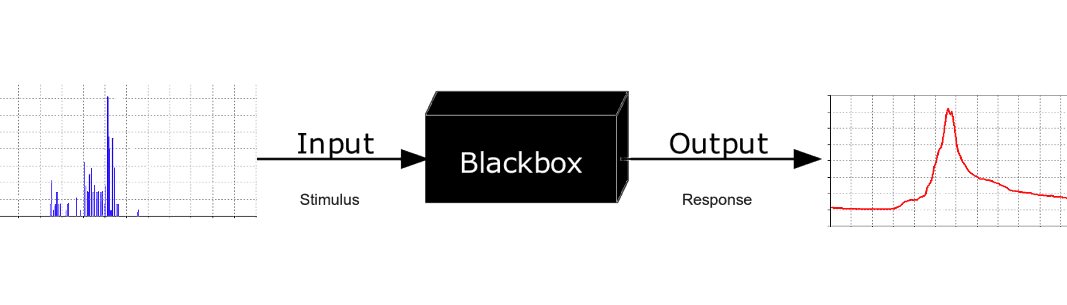
With this mindset, I like to think of a ViewModel as a “Black Box” that accepts UI triggers (button taps, table view selections, text editing events, etc.) along with other dependencies (NetworkService, DatabaseService, LocationService). It then applies Rx operators to define behavior. The ViewModel outputs transformed observables that you can bind back to your UI.
As an example, let’s implement a searchable list displayed in a table view with a search bar.
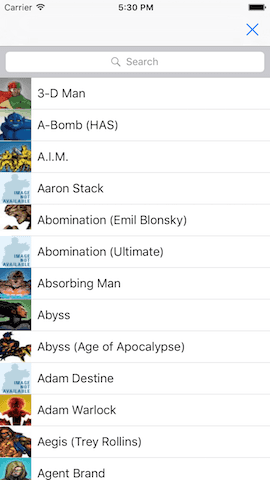
Assume that all the model layer is already implemented and we only need to create the ViewModel and ViewController.
First, let’s define our UI triggers:
- Search trigger: User types to filter data in the list
- Scroll trigger: User scrolls to load more data
Now we can define the ViewModel interface
class HeroListViewModel {

   let mainTableItems: Driver<[HeroCellSection]>
   let searchTableItems: Driver<[HeroCellSection]>

   init(uiTriggers: (
         searchQuery: Observable<String>,
         nextPageTrigger: Observable<Void>,
         searchNextPageTrigger: Observable<Void>
      ),
      api: HeroAPI)

}
Next, let’s define the transformations we want to apply to our triggers:
- Transform the search query into a network request
- Prevent firing requests for empty queries
- Debounce requests so we don’t fire on every keystroke
- Cancel previous requests in favor of new ones
- Trigger pagination when the user scrolls to the bottom
- Append new data to the existing array
Here’s the implementation:
final class HeroListViewModel {

   let mainTableItems: Driver<[HeroCellSection]>
   let searchTableItems: Driver<[HeroCellSection]>
   let dismissTrigger: Driver<Void>

   init(uiTriggers: (searchQuery: Observable<String>,
      nextPageTrigger: Observable<Void>,
      searchNextPageTrigger: Observable<Void>,
      dismissTrigger: Driver<Void>), api: HeroAPI) {


    searchTableItems = uiTriggers.searchQuery
        .filter { !$0.isEmpty }//1
        .throttle(0.3, scheduler: MainScheduler.instance)//2
        .flatMapLatest { //3
            return api.searchItems($0,
                batch: Batch.initial,
                endPoint: EndPoint.Characters,
                nextBatchTrigger: uiTriggers.searchNextPageTrigger) // 6
               .catchError { _ in
                  return Observable.empty()
               }
        }
        .map { //4
            return $0.map(HeroCellData.init)
        }
        .map {//5
            return [HeroCellSection(items: $0)]
        }
        .asDriver(onErrorJustReturn: [])
   }
}- Filters out empty strings—we don’t want to fire requests for empty queries
- Throttles input so requests only fire after a 0.3-second pause in typing
- Transforms the search query into a request and cancels any previous in-flight request
- Maps Hero objects to HeroCellData (e.g., title, image URL)
- Wraps the array of HeroCellData into HeroCellSection for UITableView binding
- Triggers the next page request for pagination
Now let’s bind our transformed Observables back to the UI:
     //1
      let viewModel = HeroListViewModel(uiTriggers:(
          searchQuery: searchCotroller.searchBar.rx_text.asObservable(),
          nextPageTrigger: tableView.rx_nextPageTriger,
          searchNextPageTrigger: searchContentController.tableView.rx_nextPageTriger
          ),
          api: DefaultHeroAPI(paramsProvider: HeroesParamsProvider.self))
      //2
      viewModel.mainTableItems
         .drive(tableView.rx_itemsWithDataSource(dataSource))
         .addDisposableTo(disposableBag)
      //3
      viewModel.searchTableItems
         .drive(searchContentController.tableView.rx_itemsWithDataSource(searchDataSource))
.addDisposableTo(disposableBag)- Create the ViewModel with UI triggers and dependencies
- Bind main table items to the
UITableView - Bind search results to the
UISearchController’s table view
Summary
- The ViewModel is “pure” and immutable—we don’t even need to keep a reference to it in the ViewController (the disposeBag keeps subscriptions alive)
- All view logic is encapsulated in one place
- It’s easily testable with RxTests
Further Reading
Happy RxSwift coding! 🚀